
Vintage Grain PU Leather Multi-Function Tablet Protective Case
author: Levi
2026-06-06
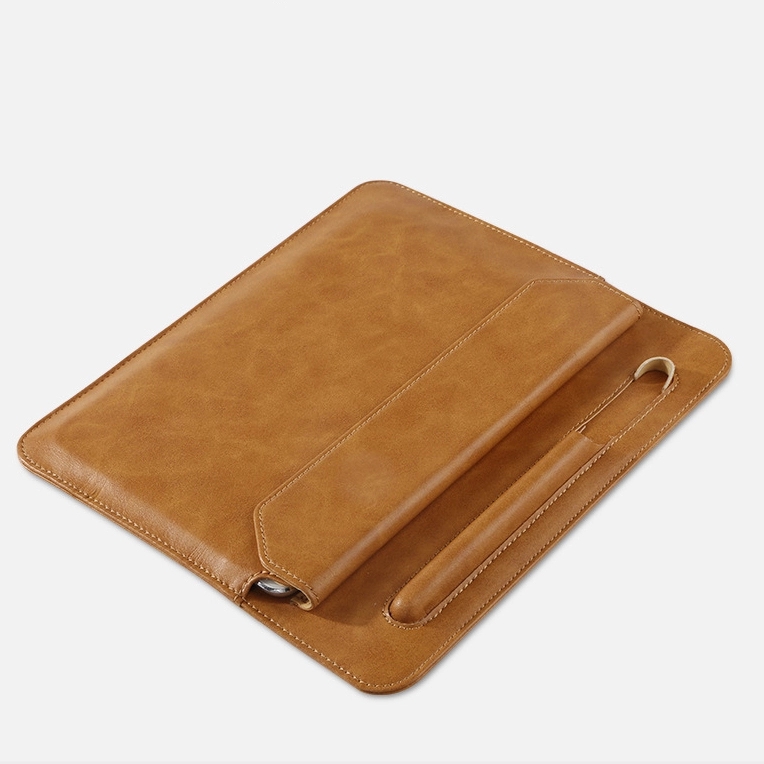
Core Product Features
1. Retro Vintage Grain PU Exterior
Select high-quality vintage textured PU leather with soft delicate hand feel, wear-resistant and anti-fouling surface, easy to wipe off daily stains; available in warm brown and classic black two timeless business colors. Precise uniform edge stitching improves whole durability for long-term frequent use.
2. Independent Dedicated Pencil Storage Slot
Custom fixed pen pouch on the cover securely holds stylus/Apple Pencil, avoiding stylus loss while keeping accessories together with the tablet without extra loose storage bags.

3. Fixed 65° Ergonomic Foldable Kickstand
Origami folded inner structure locks at stable 65° viewing angle, elevates the tablet screen to natural eye level to ease cervical fatigue during long-time reading, video watching and online meetings, no slipping while propped up.
4. Thickened Shock-Absorbent Cushion Lining
Full wrapped soft inner padding effectively buffers impact from accidental drops and bumps, preventing scratch on tablet back cover and screen, offering comprehensive daily anti-collision protection.

5. Universal Size Compatibility
Standard dimension design fits most mainstream specification tablets and full-series iPad models, ideal for students, office workers and casual readers pursuing stylish and practical integrated tablet protection.
Practical multi-purpose daily tablet accessory integrating storage, support and protection all in one.

Retractable Hidden Handle Waterproof Multi-Pocket Laptop Sleeve
Slim Soft Felt Universal Tablet Protective Sleeve
Related Article


If you still use your iPad Mini 2 for note-taking, reading or light work, finding a well-fitted case with keyboard can feel tricky. Many universal keyboard cases either do not fit the iPad Mini 2 properly or have flimsy keys that break quickly. This guide breaks down what to look for in an iPad Mini 2 case with keyboard, and introduces our reliable Vorkycase option.
iPad Mini 2 Case with Keyboard

Connecting an iPad keyboard case should be quick and effortless, but many users run into pairing failures, lag, or no connection at all. Most connection issues are not device faults — they are simply caused by incorrect setup. This honest, easy-to-follow guide covers the two most common connection methods for all iPad keyboard cases, plus quick fixes for frequent problems.
How to connect ipad keyboard case
